Understanding the Original Architecture
Over the years I’ve built several small demo environments to explain infrastructure and cloud concepts to customers and engineers. One of the most useful demos I created was a simple 3-tier application deployed entirely on virtual machines. You can check the application in the earlier blog posts Demo-App-Post3 Demo-App-Post2.
It was never meant to be a production system. The goal was to have a clean, understandable application that could demonstrate infrastructure concepts such as:
- multi-tier architecture
- load balancing
- infrastructure automation
- VM customization during deployment
Overall the purpose of the application was to check whether the environment is behaving correctly as designed or not. Because the application was designed for infrastructure demonstrations, it was intentionally simple. But that simplicity also makes it a perfect candidate for modernization.
In this blog series, I’m going to take that exact application and evolve it step-by-step from a VM-based deployment model into a containerized and eventually Kubernetes-ready platform.
This is not a theoretical exercise. We will be working with the actual code and architecture of the application I originally built, identifying the VM assumptions baked into it, and gradually transforming it into something that can run anywhere a container runtime exists.
Why Modernize This Application?
The application works perfectly well in its current form. It was designed to run on virtual machines and demonstrate common infrastructure patterns.
However, modern application platforms are increasingly based on:
- containers
- immutable infrastructure
- orchestration platforms such as Kubernetes
Applications designed for VMs often contain hidden assumptions about:
- networking
- configuration
- startup behavior
These assumptions make it difficult to move them directly into containers.
Rather than rewriting the application from scratch, the goal of this project is to show how an existing VM-based application can be gradually modernized.
We will start with the exact system I built and evolve it through several stages:
- Prepare the application for containerization
- Containerize each tier
- Run the application using Docker Compose
- Deploy the application on Kubernetes
- Eventually refactor parts of it toward a microservices-style architecture
At every stage I will explain what changes are required and why.
The Application I Originally Built
The demo application itself is intentionally straightforward. It stores and manages employee records through a small web interface. Users can:
- add employee records
- view employee information
- update records
- delete records
Behind the scenes the system uses a three-tier architecture.
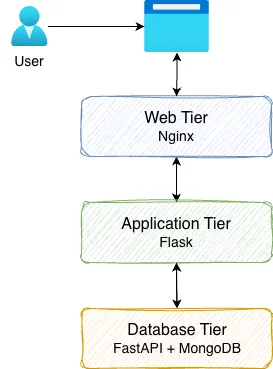
Each tier is deployed on a separate VM in the original design.
Presentation Tier — Nginx
The entry point of the application is an Nginx reverse proxy. Nginx receives requests from the browser and forwards them to the application tier. In the VM-based environment I built, this layer also supported load balancing across multiple application VMs.
This made it easy to demonstrate horizontal scaling during demos. By adding additional application servers behind Nginx, traffic could be distributed across multiple nodes.
The request flow begins like this:
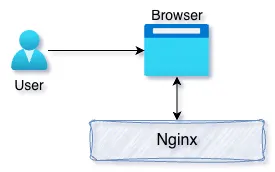
Application Tier — Flask
The application logic itself is implemented using Flask. The Flask service is responsible for:
- rendering the web interface
- accepting user input
- forwarding requests to the backend data service
- displaying results returned by the API
One interesting detail I added to the UI is that the application displays the hostname of the server handling the request. This was useful during demos because it allowed viewers to see which backend server processed each request when load balancing was enabled. Instead of talking directly to the database, the Flask application communicates with a backend API service. This separation was intentional because it introduces a clean boundary between the application logic and the data layer.
Database Tier — FastAPI and MongoDB
The backend data tier consists of two components:
- FastAPI service
- MongoDB database
The FastAPI service exposes REST endpoints for managing employee records.
Examples of operations include:
- creating employee entries
- retrieving records
- updating information
- deleting records
The FastAPI service interacts with MongoDB, which stores the actual data. Using a separate API layer between the application and database provides several benefits:
- the database implementation can change without affecting the UI
- other services could reuse the API
- responsibilities remain clearly separated
The request flow through the backend looks like this:
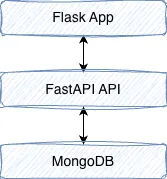
How the VM Deployment Works
The original environment was built specifically for VM-based infrastructure demos. Each component runs on a dedicated virtual machine:
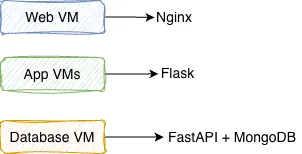
The deployment process relies heavily on VM customization scripts. During deployment the VM reads configuration values such as:
- IP addresses
- hostnames
- Other customizations
These values are injected into the system using startup scripts. For example, when the application VM boots, a script updates the configuration so that the Flask application knows how to reach the database API. Similarly, the Nginx configuration is dynamically updated to include the addresses of multiple application servers.
This approach works well in VM environments where infrastructure is typically static and known ahead of time.
What This Architecture Gets Right
Even though this application was designed for VMs, several design decisions already align well with modern architectures.
- Clear separation of tiers: Each layer has a specific responsibility.
- API-driven communication: The application tier interacts with the database through a REST API rather than direct database calls.
- Stateless application tier: The Flask application does not store persistent state locally, which makes horizontal scaling easier.
- Simple and understandable design: Because the application is intentionally simple, it provides a clean platform for demonstrating modernization techniques.
These characteristics make the application an excellent candidate for containerization.
Where the VM Assumptions Start to Appear
Although the architecture is solid, the deployment model contains several VM-specific assumptions. Examples include:
- hardcoded configuration values in the source code
- database connections assuming localhost
- startup scripts modifying configuration during boot
- reliance on fixed hostnames or IP addresses
- Nginx configuration being dynamically rewritten during VM initialization
These patterns are very common in traditional infrastructure environments, but they do not translate well to containers. Containerized systems expect a different approach:
- immutable images
- configuration supplied at runtime
- dynamic service discovery
- infrastructure managed by orchestration systems
Before we can containerize the application, we first need to remove these VM-centric assumptions.
The Modernization Journey
Rather than jumping directly into Dockerfiles, the first step is to prepare the application for portability. This means refactoring configuration so that the application can run in different environments without modifying the source code. Once configuration is externalized, we can begin packaging each tier into containers and running the entire system using tools like Docker Compose. Later in the series we will go even further and explore how the application can evolve toward a microservices-style architecture suitable for Kubernetes platforms.
What Comes Next
In the next article we will begin the first real modernization step: preparing the application for containerization.
This involves removing hardcoded infrastructure assumptions and replacing them with environment-driven configuration. Once that foundation is in place, containerizing the application becomes much easier.
Series Roadmap
This series will follow the full modernization journey of this application:
- Understanding the Original 3-Tier Architecture
- Preparing the Application for Containerization
- Containerizing the Application with Docker
- Running the Application with Docker Compose
- Preparing the Application for Kubernetes
- Deploying the Application on Kubernetes
By the end of the series, the original VM-based demo environment will evolve into a portable, containerized platform that can run anywhere.
Along the way we will explore not only how to containerize applications, but also how to think about modernizing existing systems without rewriting them from scratch.