Preparing the Application for Kubernetes
In the previous article, I completed an important milestone in the modernization journey of my demo application. The entire stack can now run using Docker Compose, including:
- Nginx (web tier)
- Flask application (application tier)
- FastAPI backend (API tier)
- MongoDB (database tier)
- A MongoDB initialization step that imports MOCK_DATA.json and creates the required indexes
At this point the application is fully containerized and reproducible. Running the system locally requires only a single command:
docker compose up --buildThis replaces the original VM-based workflow where multiple machines had to be provisioned and configured using startup scripts.
However, running containers is not the same as running on Kubernetes.
Before deploying the application to a Kubernetes cluster, we need to prepare the application architecture so that it fits Kubernetes’ operational model.
This article focuses on that preparation.
From Docker Compose to Kubernetes
Docker Compose is an excellent bridge between traditional VM deployments and modern container orchestration. It allows multiple services to run together, but it still operates on a single Docker host. Kubernetes introduces a different set of abstractions and responsibilities. Instead of managing containers directly, Kubernetes manages higher-level objects such as:
- Pods
- Deployments
- Services
- StatefulSets
- Persistent Volumes
- ConfigMaps
- Secrets
- Ingress
To prepare the application for Kubernetes, it helps to map the current Compose services to their Kubernetes equivalents.
Mapping Docker Compose Services to Kubernetes Resources
Before writing Kubernetes manifests, it is useful to understand how the services currently defined in docker-compose.yml translate into Kubernetes objects.
The architecture of the containerized stack maps naturally to Kubernetes components.
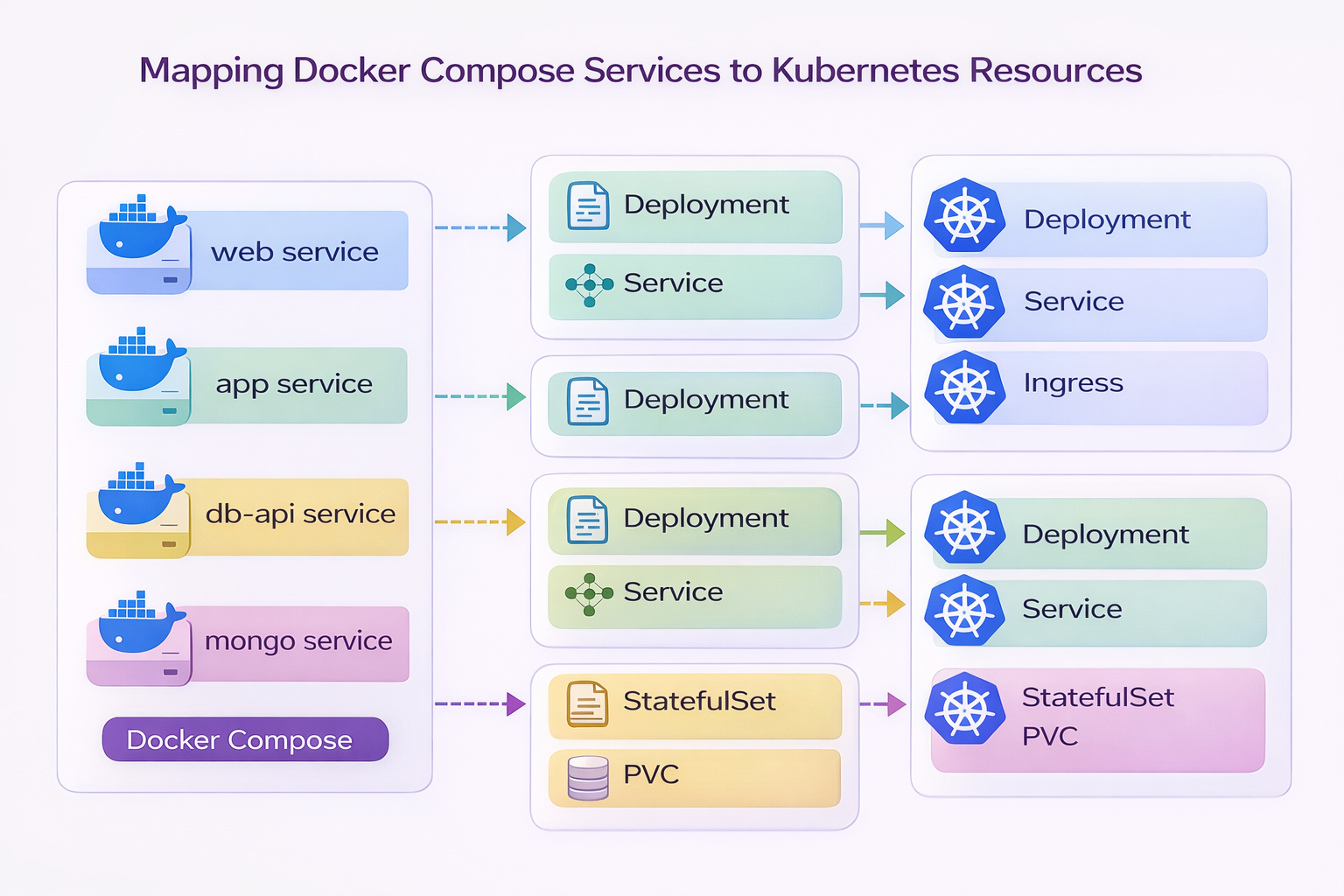
This diagram shows how the services defined in Docker Compose evolve when the application is deployed to Kubernetes.
Docker Compose Service | Kubernetes Resources |
|---|---|
web (Nginx) | Deployment + Service + Ingress |
app (Flask) | Deployment + Service |
db-api (FastAPI) | Deployment + Service |
mongo (MongoDB) | StatefulSet + PersistentVolumeClaim |
This mapping illustrates the transition from a single-host container runtime to a cluster-orchestrated platform.
Why Kubernetes Uses Different Objects
Docker Compose runs containers directly. Kubernetes instead manages containers through controllers. These controllers ensure that the desired state of the system is maintained automatically. For example:
Deployment
Deployments are used for stateless services such as:
- Nginx
- Flask
- FastAPI
Deployments allow Kubernetes to:
- restart failed pods
- perform rolling updates
- scale replicas horizontally
This means if a pod crashes, Kubernetes will automatically recreate it.
Service
A Service provides stable networking for pods.
Instead of connecting directly to container names, Kubernetes exposes services through DNS names such as:
db-api.default.svc.cluster.localThis ensures that pods can scale or restart without breaking connectivity.
The application already uses service-based networking, which makes this transition very smooth.
Ingress
Ingress handles HTTP routing into the cluster.
In the Docker Compose environment, the Nginx container acts as the entry point to the system.
In Kubernetes, we could replace Nginx with an Ingress controller. However, for this project I will keep the Nginx web tier, because it preserves the original application architecture.
Traffic will therefore flow like this:
Internet → Ingress → Nginx → Flask → FastAPI → MongoDBStatefulSet and Persistent Storage
MongoDB is different from the other services because it is stateful.
Stateless services can be recreated at any time, but a database must preserve its data. In Kubernetes, stateful workloads are managed using:
- StatefulSets
- PersistentVolumeClaims (PVCs)
This ensures that database data survives:
- pod restarts
- node failures
- cluster rescheduling
Without persistent volumes, database data would be lost every time a pod restarted.
Database Initialization in Kubernetes
In the Docker Compose version, MongoDB is prepared using an initialization container that:
- waits for MongoDB to start
- imports MOCK_DATA.json
- creates the required indexes
The logic inside the initialization step performs the following operation:
mongoimport \
  --host mongo \
  --db employees_DB \
  --collection employees \
  --file /seed/MOCK_DATA.json \
  --jsonArray \
  --drop
Then the required indexes are created:
db.employees.createIndex({ emp_id: 1 }, { unique: true })
db.employees.createIndex({ first_name: 1, last_name: 1 }, { unique: true })
In Kubernetes this same pattern will be implemented using either:
- an Init Container, or
- a Kubernetes Job
This ensures the database is prepared automatically whenever the system is deployed.
Preparing the Application Itself
Besides infrastructure changes, the application must also follow certain best practices to run well on Kubernetes. Several improvements were already introduced in earlier parts of the series.
Environment-based configuration
Hardcoded service addresses were replaced with environment variables.
For example, the Flask application now resolves the backend API dynamically:
db_fqdn= os.getenv("DB_API_HOST", "db-api")
db_port = os.getenv("DB_API_PORT", "8000")
Similarly, the FastAPI backend reads the MongoDB connection string from the environment:
MONGO_DETAILS = os.getenv("MONGO_DETAILS", "mongodb://mongo:27017")This is essential because Kubernetes injects configuration through:
- environment variables
- ConfigMaps
- Secrets
Stateless application tiers
Both the Flask application and the FastAPI service are designed to be stateless.
This allows Kubernetes to:
- scale the services horizontally
- restart pods without data loss
- perform rolling updates safely
All persistent data lives in MongoDB rather than inside container filesystems.
Service-based networking
Docker Compose allowed services to communicate using container names such as:
app
db-api
mongo
Kubernetes will provide similar service discovery through Kubernetes Services.
The application therefore already follows a service-based networking model, which fits naturally into Kubernetes networking.
What Will Change in the Next Step
At this stage, the application is structurally ready for Kubernetes, but we have not yet written the actual Kubernetes manifests.
In the next article, we will begin translating the current Compose stack into Kubernetes resources, including:
- Deployments for the application services
- Services for internal networking
- a StatefulSet for MongoDB
- PersistentVolumeClaims for database storage
- an Ingress for external access
This will transform the application from a local container stack into a cluster-orchestrated platform.
Series Progress
Part 1 — Understanding the Original 3-Tier Architecture
Part 2 — Preparing the Application for Containerization
Part 3 — Containerizing the Application with Docker
Part 4 — Running the Application with Docker Compose
Part 5 — Preparing the Application for Kubernetes
Next:
Part 6 — Deploying the Application on Kubernetes
This is where the application finally moves from a container runtime into a real Kubernetes cluster.