Running the Application with Docker Compose
In the previous article, I containerized the main components of my VM-based 3-tier application by creating Docker images for the Flask application and the FastAPI backend. At that point, the services were packaged, but they were still isolated. The next step was to run them together as a complete application stack.
This is where Docker Compose became the right tool. But for my application, simply starting the containers was not enough. One important detail from the original implementation needed to be preserved: MongoDB had to be prepared before the application was truly ready.
The database was not empty by design. My original DB VM folder contained a MOCK_DATA.json file that held the employee dataset used by the application. Before the rest of the stack could be considered ready, that data needed to be imported into MongoDB, and the required unique indexes needed to be created.
So in this part of the modernization journey, I did two things:
- defined the multi-container stack with Docker Compose
- introduced a database initialization pattern to seed and prepare MongoDB automatically
That second step is what makes this Compose setup a real operational replacement for the original VM workflow.
Why Docker Compose Fits This Stage
My original application was designed to run across separate virtual machines:
- a web tier running Nginx
- an application tier running Flask
- a database tier running FastAPI and MongoDB
In the VM version, those machines were connected using startup customization scripts. Those scripts injected IP addresses, updated configuration files, and started services in the correct order.
In the containerized version, I no longer wanted infrastructure to rewrite application files. I wanted the services to be started in a predictable way, connected through container networking, and configured through environment variables.
That is exactly what Docker Compose provides.
But in my case, I also needed Docker Compose to support one more requirement:
MongoDB must be initialized with seed data and indexes before the application stack is truly usable.
That is where an init script / init container style pattern became useful.
The First Compose Goal
At this stage of the modernization journey, the goal was not to reproduce every feature of the VM environment immediately.
The first goal was simpler:
Run the full application stack locally using containers, with the tiers wired together in a clean and portable way, and initialize MongoDB automatically.
That means:
- MongoDB runs as its own container
- the FastAPI backend runs as its own container
- the Flask application runs as its own container
- Nginx runs as its own container
- MongoDB is seeded from MOCK_DATA.json
- the required indexes are created automatically
- the services communicate using container DNS names instead of VM IP addresses
This gives me the first complete end-to-end containerized version of the application.
Updated Project Layout for the Containerized Application
At this stage of the modernization process, I reorganized the project structure slightly to make it easier to work with the containerized services.
The new layout separates the application tiers clearly and keeps the original VM startup scripts only as reference material.
demo-3-tier-app/
│
├── app/
│   ├── app.py
│   ├── Dockerfile
│   ├── requirements.txt
│   │
│   ├── static/
│   │   ├── css/
│   │   │   └── datatables.min.css
│   │   │
│   │   ├── images/
│   │   │   ├── delete.png
│   │   │   ├── edit.svg
│   │   │   └── emp_db.png
│   │   │
│   │   └── js/
│   │       ├── datatables.min.js
│   │       └── script.js
│   │
│   └── templates/
│       ├── base.html
│       ├── homepage.html
│       └── modals.html
│
├── db/
│   ├── app.py
│   ├── Dockerfile
│   ├── employee_database.py
│   ├── employee_models.py
│   ├── employee_routes.py
│   ├── requirements.txt
│   ├── gunicorn.start
│   └── MOCK_DATA.json
│
├── web/
│   └── default.conf
│
├── vm-scripts-reference/
│   ├── customize-app1-vm.start
│   ├── customize-app2-vm.start
│   ├── customize-db-vm.start
│   ├── customize-web1-vm.start
│   └── customize-web2-vm.start
│
└── docker-compose.yml
This structure reflects the logical architecture of the application:
- app/ contains the Flask application and UI assets.
- db/ contains the FastAPI backend service and the MongoDB seed data (MOCK_DATA.json).
- web/ contains the Nginx reverse proxy configuration.
- vm-scripts-reference/ keeps the original VM startup scripts for documentation purposes but they are no longer part of the runtime path.
- docker-compose.yml defines the multi-container application stack.
Keeping the original VM scripts in a dedicated reference folder is useful because it preserves the history of how the application was originally deployed while clearly separating it from the new container-based runtime.
Why This Structure Works Better
This layout also maps naturally to containerized services:
Directory | Container Role |
|---|---|
app/ | Flask application container |
db/ | FastAPI backend container |
web/ | Nginx reverse proxy container |
docker-compose.yml | multi-container orchestration |
vm-scripts-reference/ | historical deployment logic |
This clean separation makes the repository easier to understand and prepares it for the next phase of the modernization journey: Kubernetes deployment.
Application tier source
demo-3-tier-app/
app/
Database tier source
demo-3-tier-app/
db/
The web tier is no longer driven by VM startup scripts. Instead, I add a static Nginx configuration file for the containerized version. The DB VM folder also contains:
DB VM/MOCK_DATA.jsonThat file is important because it becomes the source for the initial employee dataset that needs to be imported into MongoDB.
Database Initialization
In the original workflow, MongoDB preparation was a manual operational step.
The database had to be initialized using commands like:
mongoimport --db=employees_DB --collection=employees --file=./MOCK_DATA.json --jsonArrayand then the required unique indexes had to be created:
use employees_DB
db.employees.createIndex({ emp_id: 1 }, { unique: true })
db.employees.createIndex({ first_name: 1, last_name: 1 }, { unique: true })
That logic is part of the application’s real behavior, so I did not want to ignore it in the containerized version. Instead of keeping it manual, I wanted to make it:
- repeatable
- automated
- easier to document
- closer to how Kubernetes-style initialization works later
So I chose an init script / init container pattern.
Why I Chose the Init Script Pattern
There were a few ways I could have handled MongoDB initialization.
One option was to keep the process manual. That would have matched the original workflow closely, but it would also have made the Compose setup incomplete and harder to reproduce.
Another option was to make the application itself initialize the database. I did not want that, because database bootstrap should not be hidden inside application logic.
So I chose the middle ground:
Use a dedicated initialization step that runs separately from the main application services.
This pattern works well because it keeps responsibilities clear:
- the MongoDB container runs the database
- the init step prepares the data
- the app and API containers consume the database after it is ready
This also creates a nice bridge to Kubernetes, where the same idea can later become an init container or a Job.
Compose Architecture
The logical runtime flow now looks like this:
Browser
   |
   v
Nginx Container
   |
   v
Flask Application Container
   |
   v
FastAPI Database Container
   |
   v
MongoDB Container
   ^
   |
Mongo Init Container / Script
That extra initialization step is what makes the stack truly usable.
Architecture Evolution
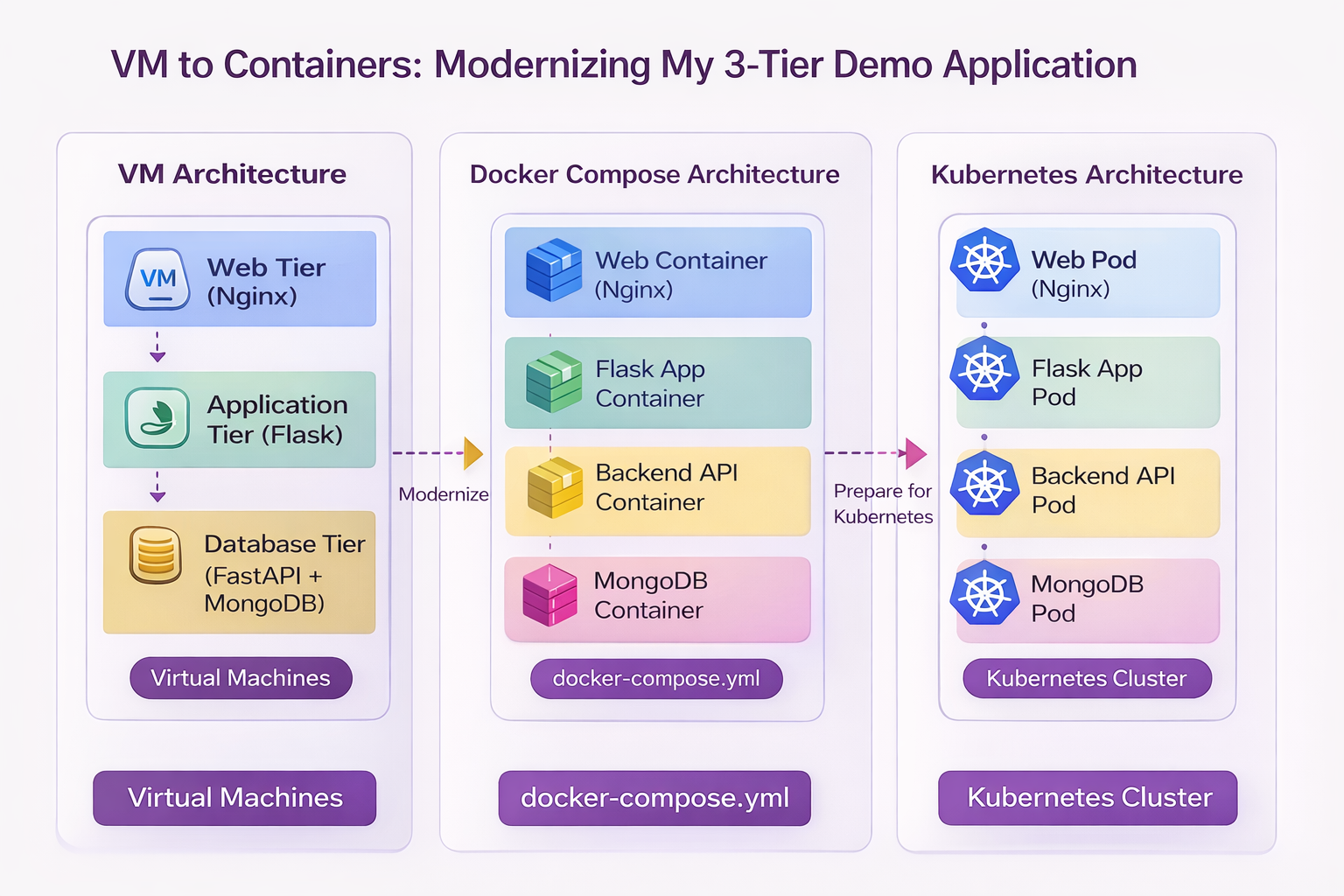
Figure — Modernization Journey: VM → Docker Compose → Kubernetes
This diagram summarizes the journey of this application so far.
On the left is the original VM-based architecture, where each tier ran on a separate virtual machine and startup scripts handled configuration and service wiring.
In the middle is the Docker Compose architecture, where the same tiers are now packaged as containers and orchestrated using docker-compose.yml.
On the right is the future Kubernetes architecture, where each service will run as Pods inside a Kubernetes cluster, with platform-native service discovery, scaling, and networking.
This progression illustrates the modernization path of the application:
Virtual Machines → Containers → Container OrchestrationHow To
This section provides details about the actual steps and changes needed for the transformation.
Step 1 — Create the Nginx Configuration
First, I create the container-native Nginx config file:
web/default.confContents:
upstream app_backend {
    server app:8080;
}

server {
    listen 80;

    location / {
        proxy_pass http://app_backend;
        proxy_set_header Host $host;
        proxy_set_header X-Real-IP $remote_addr;
        proxy_set_header X-Forwarded-For $proxy_add_x_forwarded_for;
        proxy_set_header X-Forwarded-Proto $scheme;
    }
}
This replaces the old VM startup scripts that used to rewrite upstream app server IPs into Nginx config.
Now Nginx simply points to the Compose service name:
app:8080Step 2 — Create the MongoDB Index Script
Next, I create a script that defines the required indexes. File:
mongo-init/create-indexes.jsContents:
db = db.getSiblingDB("employees_DB");

db.employees.createIndex(
  { emp_id: 1 },
  { unique: true }
);

db.employees.createIndex(
  { first_name: 1, last_name: 1 },
  { unique: true }
);
This reproduces the index creation logic from the original manual setup. It ensures:
- emp_id is unique
- the combination of first_name and last_name is unique
That prevents duplicate employee records in the same way the original setup intended.
Step 3 — Create the MongoDB Init Script
Now I create the initialization shell script. File:
mongo-init/init-mongo.shContents:
#!/bin/sh
set -e

echo "Waiting for MongoDB to be ready..."

until mongosh --host mongo --eval "db.adminCommand('ping')" >/dev/null 2>&1; do
  sleep 2
done

echo "MongoDB is ready. Importing seed data..."

mongoimport \
  --host mongo \
  --db employees_DB \
  --collection employees \
  --file /seed/MOCK_DATA.json \
  --jsonArray \
  --drop

echo "Creating indexes..."

mongosh --host mongo /scripts/create-indexes.js

echo "MongoDB initialization completed."
This script does three things:
- waits for MongoDB to start
- imports MOCK_DATA.json into the employees collection
- creates the required indexes
The --drop option ensures the collection is recreated during initialization, which is useful for repeatable local demo runs.
For a production-style workflow, I would think more carefully about whether dropping the collection is appropriate. For this demo modernization path, it makes the setup reproducible.
Step 4 — Create the Docker Compose File
The next file is the updated:
docker-compose.ymlA practical version looks like this:
version: "3.9"

services:
  mongo:
    image: mongo:6
    container_name: demo-mongo
    restart: unless-stopped
    ports:
      - "27017:27017"
    volumes:
      - mongo_data:/data/db

  mongo-init:
    image: mongo:6
    container_name: demo-mongo-init
    depends_on:
      - mongo
    volumes:
      - ./db/MOCK_DATA.json:/seed/MOCK_DATA.json:ro
      - ./mongo-init/init-mongo.sh:/scripts/init-mongo.sh:ro
      - ./mongo-init/create-indexes.js:/scripts/create-indexes.js:ro
    entrypoint: ["/bin/sh", "/scripts/init-mongo.sh"]

  db-api:
    build:
      context: ./db
    container_name: demo-db-api
    restart: unless-stopped
    environment:
      MONGO_DETAILS: mongodb://mongo:27017
    depends_on:
      - mongo
      - mongo-init
    ports:
      - "8000:8000"

  app:
    build:
      context: ./app
    container_name: demo-app
    restart: unless-stopped
    environment:
      DB_API_HOST: db-api
      DB_API_PORT: "8000"
    depends_on:
      - db-api
    ports:
      - "8080:8080"

  web:
    image: nginx:alpine
    container_name: demo-web
    restart: unless-stopped
    depends_on:
      - app
    ports:
      - "80:80"
    volumes:
      - ./web/default.conf:/etc/nginx/conf.d/default.conf:ro

volumes:
  mongo_data:
This Compose file defines five services:
- mongo
- mongo-init
- db-api
- app
- web
The most important addition is mongo-init, which performs the one-time bootstrap logic that used to be manual.
Why the mongo-init Service Matters
The mongo-init service is not part of the normal request path. Its only job is to prepare the database. That makes it conceptually similar to what later becomes:
an init container
- a bootstrap job
- a migration job
This is a much cleaner pattern than forcing the app or API container to secretly initialize MongoDB. It also makes the deployment model easier to understand.
The sequence becomes:
- start MongoDB
- initialize MongoDB
- start the API
- start the Flask app
- start Nginx
That reflects the true runtime dependency order of the application.
Step 5 — Build and Start the Stack
Once the files are in place, I can build and start the entire application using:
docker compose up --buildThis does several things:
- builds the Flask image
- builds the FastAPI image
- starts the MongoDB container
- runs the mongo-init service
- starts the backend API
- starts the Flask app
- starts Nginx
If everything works correctly, the user-facing application becomes available through the Nginx container.
Step 6 — Verify the Database Initialization
A useful validation step is to confirm that the seed data and indexes were applied successfully.
Check the init logs
docker logs demo-mongo-initYou should see messages similar to:
Waiting for MongoDB to be ready...
MongoDB is ready. Importing seed data...
Creating indexes...
MongoDB initialization completed.
Connect to MongoDB
docker exec -it demo-mongo mongoshThen run:
use employees_DB
db.employees.countDocuments()
db.employees.getIndexes()
This confirms:
- the employee records were imported
- the required indexes exist
That gives confidence that the stack is not only running, but correctly initialized.
What Docker Compose Is Replacing
At this point, Docker Compose is replacing several responsibilities that were previously handled in VM-specific ways.
VM Deployment Behavior | Docker Compose Replacement |
|---|---|
Separate VM provisioning | Multi-service Compose file |
Startup script-based config injection | Environment variables |
Nginx upstream rewriting | Static config with service names |
Manual service startup | docker compose up |
Manual Mongo installation | Official Mongo container |
Manual database import | mongo-init bootstrap service |
Manual index creation | scripted initialization |
Manual inter-tier wiring | built-in container networking |
This is the point where the application starts to feel like a modern platform rather than a VM demo environment.
Important Limitation at This Stage
For this first Compose version, I am intentionally keeping the runtime simple.
In the original VM environment, the application tier could be load balanced across multiple application VMs. That is an important part of the design, but I am not reproducing that immediately in this first Compose baseline.
For now, the Compose version uses:
- one Nginx container
- one Flask container
- one FastAPI container
- one MongoDB container
- one MongoDB initialization service
Why?
Because the first goal is to get a clean, repeatable, fully working containerized stack.
Once that is stable, I can explore:
- multiple Flask replicas
- load-balanced container topologies
- more advanced orchestration behavior
- later Kubernetes Services and Ingress
This staged approach keeps the modernization process practical and teachable.
Files That Matter Most in This Step
Here are the key files introduced or used in this phase.
New files
- docker-compose.yml
- web/default.conf
- mongo-init/init-mongo.sh
- mongo-init/create-indexes.js
- app/Dockerfile
- db/Dockerfile
Updated files from previous step
- app/app.py
- db/employee_database.py
Files kept from the original application
- Flask templates
- FastAPI route and model files
- db/MOCK_DATA.json
Files no longer used at runtime
- customize-app1-vm.start
- customize-app2-vm.start
- customize-db-vm.start
- customize-web1-vm.start
- customize-web2-vm.start
- gunicorn.start files
Those VM-era files are still valuable for documentation and comparison, but Docker Compose now takes over their operational role.
What This Step Achieves
This phase is a major turning point in the project. By introducing Docker Compose and the MongoDB initialization pattern, I now have:
- a full multi-container application stack
- container-native service discovery
- reproducible local startup
- automated database preparation
- simpler configuration handling
- a deployment model much closer to Kubernetes thinking
This is no longer just an application that has been “put into containers.” It is starting to behave like a real portable platform.
What Comes Next
Now that the application can run as a complete containerized stack, including automatic database initialization, the next step is to prepare it for Kubernetes.
That does not mean jumping directly into manifests. First, I want to look at what still needs improvement from a platform perspective, including:
- health checks
- environment separation
- persistent storage considerations
- container readiness
- service boundaries
- how the database bootstrap process should evolve in Kubernetes
These are the things that matter when moving from Compose to Kubernetes.
Series Progress
Part 1 — Understanding the Original 3-Tier Architecture
Part 2 — Preparing the Application for Containerization
Part 3 — Containerizing the Application with Docker
Part 4 — Running the Application with Docker Compose
Next:
Part 5 — Preparing the Application for Kubernetes
This is where the containerized application begins evolving into something that can run well on an orchestration platform.